NextDNS and Unifi Dream Machine Setup in 2026
NextDNS
Go to NextDNS.com and setup an account, it can be the free or pro unlimited plan that is currently $20 a year.
Next DNS
Under the Setup tab scroll down and choose Routers and scroll down to DNSCrypt
- Copy the “stamp”, it should be something like sdns://aaaaaaaaaaaaaaaaaaaaaaaaaaaaaaaaaaaaaaaaaaaaaa but with a random assortment of upper case and lower case letters
- Also copy the “static” NextDNS-aaaaaa which should be a mix of numbers and letters
Dream Machine
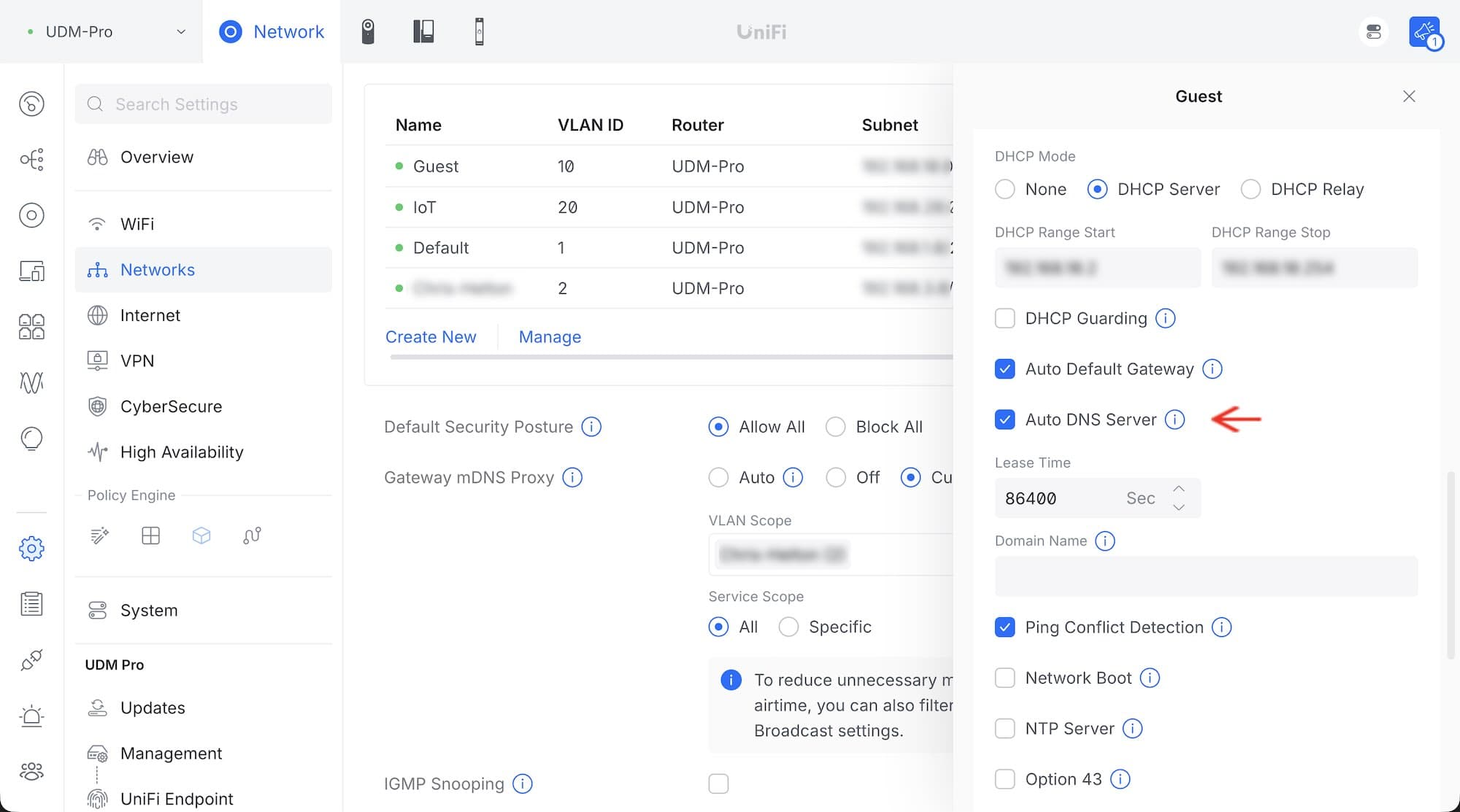
On the Dream Machine you want to make sure that all of your ISP/WAN and networks have their Auto DNS Server setting checked so that when you setup NextDNS server settings in the CyberSecure settings all of your networks will use it.
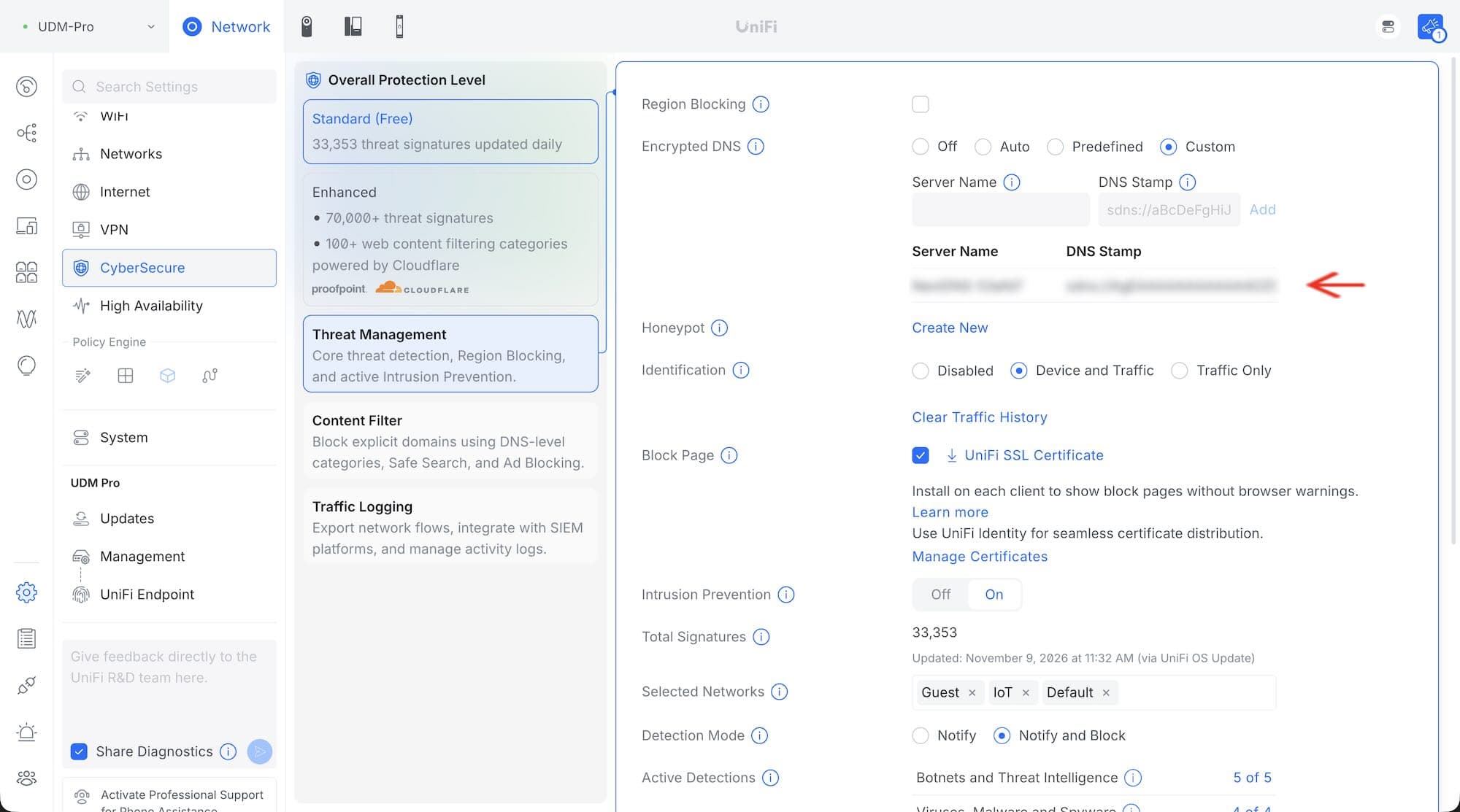
On the Dream Machine navigate to Settings, then CyberSecure.
- Choose Custom
- Enter the “static” value in the Server Name field
- Enter the “stamp” value in the DNS Stamp field
- Save
Then be a little patient as it may take awhile for the changes to take affect on your machines. With my laptop a restart of the machines got it working quickly.
NextDNS Certificate
Having the NextDNS certificate installed on each of your computers will show a nice screen when content is blocked instead of the generic unavailable/not allowed browser messaging. For me this is primarily a troubleshooting tool, it makes determining a website’s issues easier.
On the NextDNS dashboard navigate to Settings and scroll down to NextDNS Root CA and download their certificate and follow the instructions for how to install it on each of your devices.
iOS
In the instructions they instruct you to General → Profiles, but on my phone it is General → VPN & Device Management.
What worked for me was to download the certificate to Files, opening the Files app, searching for the certificate “next”, and then clicking on it. That opened the right app and all I needed to do was accept it.
macOS
MacOS installation of the certificate was accomplished by double-clicking the certificate and choosing “system” from the dropdown and saving.
Apps
Installing the app will keep your devices using your NextDNS settings even when you are not on your home network.
Then I installed the iOS app on my iPhone which included adding a VPN & Device Management profile which worked as instructed by the app, just be aware the wording may not match exactly what you see in the NextGen app.
On my iPad once the certificate was downloaded to Files I had to go to the VPN & Device Management screen where the certificate was available but not active. Clicking on it prompted me to install it.
NextDNS Security & Privacy
Under Security I turned on a bunch of stuff that made sense to me and under Privacy I found most of the lists I have used with Pi-Hole and AdGuard in the past so chose a bunch of those to enable.
Notes
It may not be necessary, but when I make a change like this I visit each of my machines, open each web browser and clear the history for all time, and then restart the machine.